Choosing the Right Photos for Your Zombie Love Story Video
The photo rules that decide whether your zombie AI love story video looks cinematic or uncanny — lighting, framing, role choice, and consent.
Your zombie love story video is only as good as the two photos behind it. The scene, the makeup, and the edit are fixed — the photos are the one variable you control. Here is what separates a cinematic result from an uncanny one.
The five rules of a good input photo
- Front-facing. The transformation maps your face into the scene's character frames; a three-quarter or profile angle has less to work with.
- Face fully visible. No sunglasses, no hair across the face, no hands or masks. One person per photo.
- Even, natural light. A window or outdoor shade beats a dim bar photo. Heavy shadows and hard flash both fight the makeup pass.
- No heavy filters. Beauty filters smooth away the detail the transformation needs. A plain camera photo wins.
- The right file. JPG, PNG, or WebP, up to 20 MB each. A crisp phone photo is plenty — resolution is not usually the problem; lighting is.
A photo you can learn from
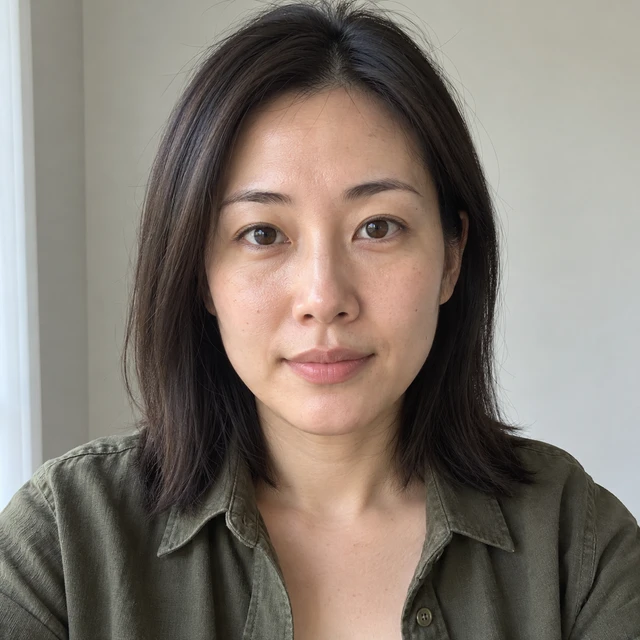
This original AI-created adult is an input example, not a customer photo. Both eyes and the full face are visible. Avoid blur, sunglasses, distant faces, heavy filters and several people in one frame.
A couple photo needs to be cropped into two separate portraits before upload. The current generator does not automatically split a group photo.
Try the example experience without sending your own photos. Viewing the pre-made examples does not generate a new video or cost credits.
Who plays the zombie?
The second photo you upload is the one that turns. There is no wrong answer — the scene's makeup does the heavy lifting — but two choices read especially well:
- Either partner as the zombie: the clouded eyes and slow turn land better with someone who commits.
- The other partner as the survivor: the trembling gun-hold is the emotional anchor of the clip, and it reads strongest on a steady face.
Changed your mind? The swap button flips the roles before you generate — same photos, opposite story.
Adult pairs and friends
Our published examples use adult human portraits. You can cast adult friends in the same story, but there is no separate friends plot or relationship setting. Pet results have not been verified for this template.
The consent rules — non-negotiable
Every identifiable person in a photo must have knowingly agreed to the AI transformation and the use of their likeness. Photos of minors are never accepted — not as the survivor, not as the zombie, not in the background. The service is for adults, and accounts that try to upload children's photos lose access.
This is both an ethical rule and a practical one: a clip you do not have the right to post is a clip that comes down. Get the yes first, then make the video.
From photos to finished video
Once your photos pass the checklist, generate your zombie love story video: upload them, pick 9:16 or 16:9, and press generate. The finished 15-second clip — ready for your own sound, no watermark — is ready in a few minutes, with a download button right next to it.